At 6AM today, McAfee released an update to its antivirus definitions for corporate customers which had a slight problem. And that slight problem makes PC useless until manual repair.
Thursday, April 22, 2010


Thursday, April 15, 2010
Dhingra Bluetooth Chat
Dhingra Bluetooth Chat, A bluetooth chat application to communicate with your friends using bluetooth enabled mobile phones, This application can be run on any java enabled phone.
It's in Beta version now, So just check it out at http://www.chat.dhingra.co.in/ and do give your valuable feedbacks and suggestion by replying to this post or send a mail to chat@dhingra.co.in
Dhingra Bluetooth Chat - Give it a try friends.
It's in Beta version now, So just check it out at http://www.chat.dhingra.co.in/ and do give your valuable feedbacks and suggestion by replying to this post or send a mail to chat@dhingra.co.in
Dhingra Bluetooth Chat - Give it a try friends.
Wednesday, April 14, 2010
Paypal Alternative - AlertPay
Paypal, Major e-transaction holder, creates many problems for many users, Its validation process as we know is very tough. Start even asking for PAN number for Indian user. So with all these problems, we are looking at an alternative to Paypal, After doing so many search at google, I found that AlertPay is a major and good alternative to Paypal, with service much better that Paypal. So if you want to give it a try, go for it.

Check Paypal Balance without PAN number for India
As all of us are knowing that after 3rd march, 2010, Paypal has started asking for PAN number for Indian users of Paypal. This step has been taken because RBI needs to keep a track on money coming to India from outside.
So now if you will login to paypal account it will ask for your PAN number, if you haven't given PAN number to Paypal earlier.
There is a trick I am giving you now which I used to check my account balance of Paypal account. I used it for balance checking only, So if you are trying to do transaction other transaction using this trick then do it at your own risk
Trick goes this way. First login to Paypal using your email and password, It will show a screen asking for PAN number and mobile number.

Now keep this page as it is and open a new Tab and type http://paypal.com in the address bar. And yeah your account page will open in the new tab.From here you can see your account balance easily.
So now if you will login to paypal account it will ask for your PAN number, if you haven't given PAN number to Paypal earlier.
There is a trick I am giving you now which I used to check my account balance of Paypal account. I used it for balance checking only, So if you are trying to do transaction other transaction using this trick then do it at your own risk
Trick goes this way. First login to Paypal using your email and password, It will show a screen asking for PAN number and mobile number.

Now keep this page as it is and open a new Tab and type http://paypal.com in the address bar. And yeah your account page will open in the new tab.From here you can see your account balance easily.
Tuesday, April 13, 2010
Phishing and Pharming
Phishing and Pharming are two techniques of hacking and here you will come to know the exact difference between two similar appealing words.
Phishing
Act of sending an email to a user falsely claiming to be an established legitimate enterprise in an attempt to scam the user into surrendering private information that will be used for identity theft. The e-mail directs the user to visit a website where user are asked to update personal information, such as passwords and credit card, social security, and bank account numbers, that the legitimate organization already has.
Pharming
Pharming is the exploitation of a vulnerability in DNS Server that allows a hacker to redirect a website's traffic to another web site (Another web site is intensionally made similar to cheat visitors). DNS servers are the server responsible for resolving Internet names into their real addresses, and are used anytime a user types the name of a website into his or her web browser and attempts to view a web page. Hence by redirecting user to some fake site information can be stolen using phishing described above.
Phishing
Act of sending an email to a user falsely claiming to be an established legitimate enterprise in an attempt to scam the user into surrendering private information that will be used for identity theft. The e-mail directs the user to visit a website where user are asked to update personal information, such as passwords and credit card, social security, and bank account numbers, that the legitimate organization already has.
Pharming
Pharming is the exploitation of a vulnerability in DNS Server that allows a hacker to redirect a website's traffic to another web site (Another web site is intensionally made similar to cheat visitors). DNS servers are the server responsible for resolving Internet names into their real addresses, and are used anytime a user types the name of a website into his or her web browser and attempts to view a web page. Hence by redirecting user to some fake site information can be stolen using phishing described above.
Monday, April 12, 2010
nokia tricks
View the firmware version of the phone
Dial using the keypad: * # 0000 # – the version number displayed on the display.
V 5.16
22-06-99
NSM-1
V 5.16 – software version
22-06-99 – date
NSM-1 – The hardware (model)
View IMEI
Dial using the keypad: * # 06 # – IMEI number is displayed on the display.
SimClock
Allows you to check whether your SIM-card mode StopClock. When transferring the card to this mode significantly reduces power consumption and thus increases the work of the battery. Generally, all modern SIM-cards support this mode.
*#7780# reset to factory settings.
*#67705646# This will clear the LCD display (operator logo).
*#0000# To view software version.
*#2820# Blue tooth device address.
*#746025625# Sim clock allowed status.
*#62209526# – Display the MAC address of the WLAN adapter. This is available only in the newer devices that support WLAN
#pw+1234567890+1# Shows if sim have restrictions.
*#92702689# – takes you to a secret menu where you may find some of the information below:
1. Displays Serial Number.
2. Displays the Month and Year of Manufacture
3. Displays (if there) the date where the phone was purchased (MMYY)
4. Displays the date of the last repair – if found (0000)
5. Shows life timer of phone (time passes since last start)
*#3370# – Enhanced Full Rate Codec (EFR) activation. Increase signal strength, better signal reception. It also help if u want to use GPRS and the service is not responding or too slow. Phone battery will drain faster though.
*#3370* – (EFR) deactivation. Phone will automatically restart. Increase battery life by 30% because phone receives less signal from network.
*#4720# - Half Rate Code activation.
*#4720* – Half Rate Code deactivation. The phone will automatically restart
If you forgot wallet code for Nokia S60 phone, use this code reset: *#7370925538#
Note, your data in the wallet will be erased. Phone will ask you the lock code. Default lock code is: 12345
Press *#3925538# to delete the contents and code of wallet.
Unlock service provider: Insert sim, turn phone on and press vol up(arrow keys) for 3 seconds, should say pin code. Press C,then press * message should flash, press * again and 04*pin*pin*pin#
*#7328748263373738# resets security code.
Default security code is 12345
SIM Clock
Stop allowed
Warranty Codes
* # 92702689 # [* # war0anty #]
Enter the menu of warranty codes. In fact, you do not need, but you can find them using the arrows scroll menu.
Menu:
Shows the serial number of the device.
Date and year of manufacture (eg 0299).
Shows month and year of sale (if installed). Here you can set the date, but be careful – it can be done only once in their life phone
Date of last repair (if any)
Sends all the phone numbers, pictures, and calls from one phone to another (possibly in order to restore). In models with an infrared eye, this procedure works, and through him
...etc .... Explore UR Handset 4 more info
Dial using the keypad: * # 0000 # – the version number displayed on the display.
V 5.16
22-06-99
NSM-1
V 5.16 – software version
22-06-99 – date
NSM-1 – The hardware (model)
View IMEI
Dial using the keypad: * # 06 # – IMEI number is displayed on the display.
SimClock
Allows you to check whether your SIM-card mode StopClock. When transferring the card to this mode significantly reduces power consumption and thus increases the work of the battery. Generally, all modern SIM-cards support this mode.
*#7780# reset to factory settings.
*#67705646# This will clear the LCD display (operator logo).
*#0000# To view software version.
*#2820# Blue tooth device address.
*#746025625# Sim clock allowed status.
*#62209526# – Display the MAC address of the WLAN adapter. This is available only in the newer devices that support WLAN
#pw+1234567890+1# Shows if sim have restrictions.
*#92702689# – takes you to a secret menu where you may find some of the information below:
1. Displays Serial Number.
2. Displays the Month and Year of Manufacture
3. Displays (if there) the date where the phone was purchased (MMYY)
4. Displays the date of the last repair – if found (0000)
5. Shows life timer of phone (time passes since last start)
*#3370# – Enhanced Full Rate Codec (EFR) activation. Increase signal strength, better signal reception. It also help if u want to use GPRS and the service is not responding or too slow. Phone battery will drain faster though.
*#3370* – (EFR) deactivation. Phone will automatically restart. Increase battery life by 30% because phone receives less signal from network.
*#4720# - Half Rate Code activation.
*#4720* – Half Rate Code deactivation. The phone will automatically restart
If you forgot wallet code for Nokia S60 phone, use this code reset: *#7370925538#
Note, your data in the wallet will be erased. Phone will ask you the lock code. Default lock code is: 12345
Press *#3925538# to delete the contents and code of wallet.
Unlock service provider: Insert sim, turn phone on and press vol up(arrow keys) for 3 seconds, should say pin code. Press C,then press * message should flash, press * again and 04*pin*pin*pin#
*#7328748263373738# resets security code.
Default security code is 12345
SIM Clock
Stop allowed
Warranty Codes
* # 92702689 # [* # war0anty #]
Enter the menu of warranty codes. In fact, you do not need, but you can find them using the arrows scroll menu.
Menu:
Shows the serial number of the device.
Date and year of manufacture (eg 0299).
Shows month and year of sale (if installed). Here you can set the date, but be careful – it can be done only once in their life phone
Date of last repair (if any)
Sends all the phone numbers, pictures, and calls from one phone to another (possibly in order to restore). In models with an infrared eye, this procedure works, and through him
...etc .... Explore UR Handset 4 more info
Saturday, April 10, 2010
motorola tricks
Try these at your own risk.(though there should be no potential harm>>)
[] (pause) means the * key held in until box appears.
Select phone line - (use this to write things below the provider name):
[] [] [] 0 0 8 [] 1 []
Add phonebook to main menu:
[] [] [] 1 0 5 [] 1 []
Add messages to main menu:
[] [] [] 1 0 7 [] 1 []
Copy SIM memory (phonebook menu):
[] [] [] 1 0 8 [] 1 []
Eng Field options (main menu):
[] [] [] 1 1 3 [] 1 []
Slow (Frequency of search menu):
[] [] [] 1 0 1 [] 1 []
Medium (Frequency of search menu):
[] [] [] 1 0 2 [] 1 []
Fast (Frequency of search menu):
[] [] [] 1 0 3 [] 1 []
Enable EFR:
[] [] [] 1 1 9 [] 1 []
Function :
[] [] [] # # # [] 1 []
Change pin:
[] [] [] 0 0 4 [] 1 []
Unblocking using the "puk" number:
[] [] [] 0 0 5 [] 1 []
You can change GSM frequencies to 900/1800 by entering the enginnering model.
Following the below steps:
enter menu and press 048263* quickly,
then you will enter the secret engineering menu under "Opcode"
input 10*0*3 for GSM 900
10*0*4 for GSM 1800
10*0*5 for GSM 1900
10*0*6 for dual band GSM 900/1800
10*0*7 for dual band GSM 850/1900
[] (pause) means the * key held in until box appears.
Select phone line - (use this to write things below the provider name):
[] [] [] 0 0 8 [] 1 []
Add phonebook to main menu:
[] [] [] 1 0 5 [] 1 []
Add messages to main menu:
[] [] [] 1 0 7 [] 1 []
Copy SIM memory (phonebook menu):
[] [] [] 1 0 8 [] 1 []
Eng Field options (main menu):
[] [] [] 1 1 3 [] 1 []
Slow (Frequency of search menu):
[] [] [] 1 0 1 [] 1 []
Medium (Frequency of search menu):
[] [] [] 1 0 2 [] 1 []
Fast (Frequency of search menu):
[] [] [] 1 0 3 [] 1 []
Enable EFR:
[] [] [] 1 1 9 [] 1 []
Function :
[] [] [] # # # [] 1 []
Change pin:
[] [] [] 0 0 4 [] 1 []
Unblocking using the "puk" number:
[] [] [] 0 0 5 [] 1 []
You can change GSM frequencies to 900/1800 by entering the enginnering model.
Following the below steps:
enter menu and press 048263* quickly,
then you will enter the secret engineering menu under "Opcode"
input 10*0*3 for GSM 900
10*0*4 for GSM 1800
10*0*5 for GSM 1900
10*0*6 for dual band GSM 900/1800
10*0*7 for dual band GSM 850/1900
Thursday, April 8, 2010
Sony Ericsson handsets secret menu
Try these at your own risk:(No potential harm though.)
1. Sony Ericsson Secret Menu: -> * <- <- * <- * (-> means press joystick, arrow keys or jogdial to the right and <- means left.) You'll see phone model, software info, IMEI, configuration info, sim lock status, REAL time clock, total call time and text labels. You can also test your phones services and hardware from this menu (main display, camera, LED/illumination, Flash LED, keyboard, earphone, speaker, microphone, radio and vibrator tests)
2. IMEI Number: *#06# -For checking the International Mobile Equipment Identity.
3. Lock status : <- * * <- -SIM lock - Do not lock your phone if you don't know the unlock code. This is another good check before you buy any phone, especially second hand ones. If phone is SIM locked, you may not be able to switch to other GSM operators.
4. Shortcut to last dialed numbers: 0#
5. Shortcut to sim numbers: On main menu type a number and press #
6. If you change the language from default to any other language, then it may be difficult to switch to default language. The shortcut is very simple. Just press <0000>. <> stands for right arrow button or joystick.
A few good handset videos:
http://www.youtube.com/watch?v=DXxcsoaqVLo
http://www.youtube.com/watch?v=gXV97pQa9EU&feature=channel
1. Sony Ericsson Secret Menu: -> * <- <- * <- * (-> means press joystick, arrow keys or jogdial to the right and <- means left.) You'll see phone model, software info, IMEI, configuration info, sim lock status, REAL time clock, total call time and text labels. You can also test your phones services and hardware from this menu (main display, camera, LED/illumination, Flash LED, keyboard, earphone, speaker, microphone, radio and vibrator tests)
2. IMEI Number: *#06# -For checking the International Mobile Equipment Identity.
3. Lock status : <- * * <- -SIM lock - Do not lock your phone if you don't know the unlock code. This is another good check before you buy any phone, especially second hand ones. If phone is SIM locked, you may not be able to switch to other GSM operators.
4. Shortcut to last dialed numbers: 0#
5. Shortcut to sim numbers: On main menu type a number and press #
6. If you change the language from default to any other language, then it may be difficult to switch to default language. The shortcut is very simple. Just press <0000>. <> stands for right arrow button or joystick.
A few good handset videos:
http://www.youtube.com/watch?v=DXxcsoaqVLo
http://www.youtube.com/watch?v=gXV97pQa9EU&feature=channel
Sunday, April 4, 2010
WHAT IF YOU CAN GO FULL SCREEN INSTEAD OF JUST MAXIMIZING IT...
When you need a really big window, don't just maximize it: go full screen! To view a window full screen, when the window is active, press the F11 key at the top of your keyboard—to get the biggest window possible.

Arrange windows on your desktop in windows xp
Here comes one more trick to display any two windows side by side on the desktop by first clicking a window's button on the Taskbar. Next, press and hold the Ctrl key and right-click the second window that you want to open, then click Tile Vertically. This works great when you want to view two Microsoft Word or Microsoft Internet Explorer windows at the same time.

Saturday, April 3, 2010
audio cd v/s mp3 cd
Friends,many of you won't be knowing that audio cd differs much much from mp3 cd .
To make it simple, an audio CD (Compact Disc Digital Audio) is one that you buy from stores and contains only audio tracks. Audio CDs are compatible with most of current CD-drives, including your CD/DVD drive on your computer, and your car CD player.
The audio tracks are uncompressed digital data (essentially WAV). This explains why you can't fit 100 songs in an audio CD like an MP3 CD because the size of each track is big.Try to plug an audio CD into your computer CD/DVD drive, what you'd see are some files with the names similar to "track01.cda". These are audio tracks and called "pointers" files, and you can't just open them with your computer like any other computer file. The actual audio data is stored on the CD sectors and cannot be viewable on your computers.
MP3 (or "MPEG-1 Audio Layer 3") is an encoding format for audio data. An MP3 file is a compressed audio file.MP3 files are just like any other computer files. You can move them from place to place on your computer, or you can open them using different application software. MP3 CD is not like an audio CD but like an any other computer discs: it contains data files, not audio tracks.
So what makes it a big deal? Many CD-copy software have different selections for "Audio" and "Data". The "Audio" option is for creating a standard CD with audio tracks, while the "Data" option can be used to copy either computer data or MP3 files. Remember MP3 files are just like computer data files!
that's it!!!!
To make it simple, an audio CD (Compact Disc Digital Audio) is one that you buy from stores and contains only audio tracks. Audio CDs are compatible with most of current CD-drives, including your CD/DVD drive on your computer, and your car CD player.
The audio tracks are uncompressed digital data (essentially WAV). This explains why you can't fit 100 songs in an audio CD like an MP3 CD because the size of each track is big.Try to plug an audio CD into your computer CD/DVD drive, what you'd see are some files with the names similar to "track01.cda". These are audio tracks and called "pointers" files, and you can't just open them with your computer like any other computer file. The actual audio data is stored on the CD sectors and cannot be viewable on your computers.
MP3 (or "MPEG-1 Audio Layer 3") is an encoding format for audio data. An MP3 file is a compressed audio file.MP3 files are just like any other computer files. You can move them from place to place on your computer, or you can open them using different application software. MP3 CD is not like an audio CD but like an any other computer discs: it contains data files, not audio tracks.
So what makes it a big deal? Many CD-copy software have different selections for "Audio" and "Data". The "Audio" option is for creating a standard CD with audio tracks, while the "Data" option can be used to copy either computer data or MP3 files. Remember MP3 files are just like computer data files!
that's it!!!!
TO FIND WHO IS INVISIBLE ON YAHOO MESSENGER
There is this small trick that you can use to find out what the truth is.
Firstly open your yahoo messenger main window and double click on the name of the person whom you want to check. The chat window will open obviously.
Click IMVironment button, select See all IMVironments, select Yahoo! Tools or Interactive Fun, and click on Doodle.
After loading the Doodle imvironment there can be two possibilities
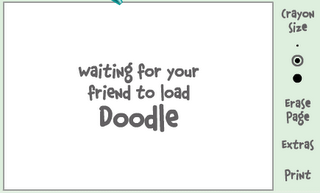
1.If the user is offline Doodle are will show this "waiting for your friend to load Doodle" continuously.
Firstly open your yahoo messenger main window and double click on the name of the person whom you want to check. The chat window will open obviously.
Click IMVironment button, select See all IMVironments, select Yahoo! Tools or Interactive Fun, and click on Doodle.
After loading the Doodle imvironment there can be two possibilities
1.If the user is offline Doodle are will show this "waiting for your friend to load Doodle" continuously.
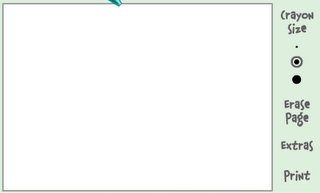
2. If the user is online (but in invisible mode), after few seconds (it can take up to one minute, depending on your connection speed), you should get a blank page. So you know that the user is online.
Subscribe to:
Posts (Atom)